Up to 500% Faster Downloads

Ostrich Download Manager

Smart AccelerationResume SupportQueue ManagementSchedule DownloadsClipboard & Browser Capture — Trusted by 50,000+ users. The best IDM alternative for Windows.

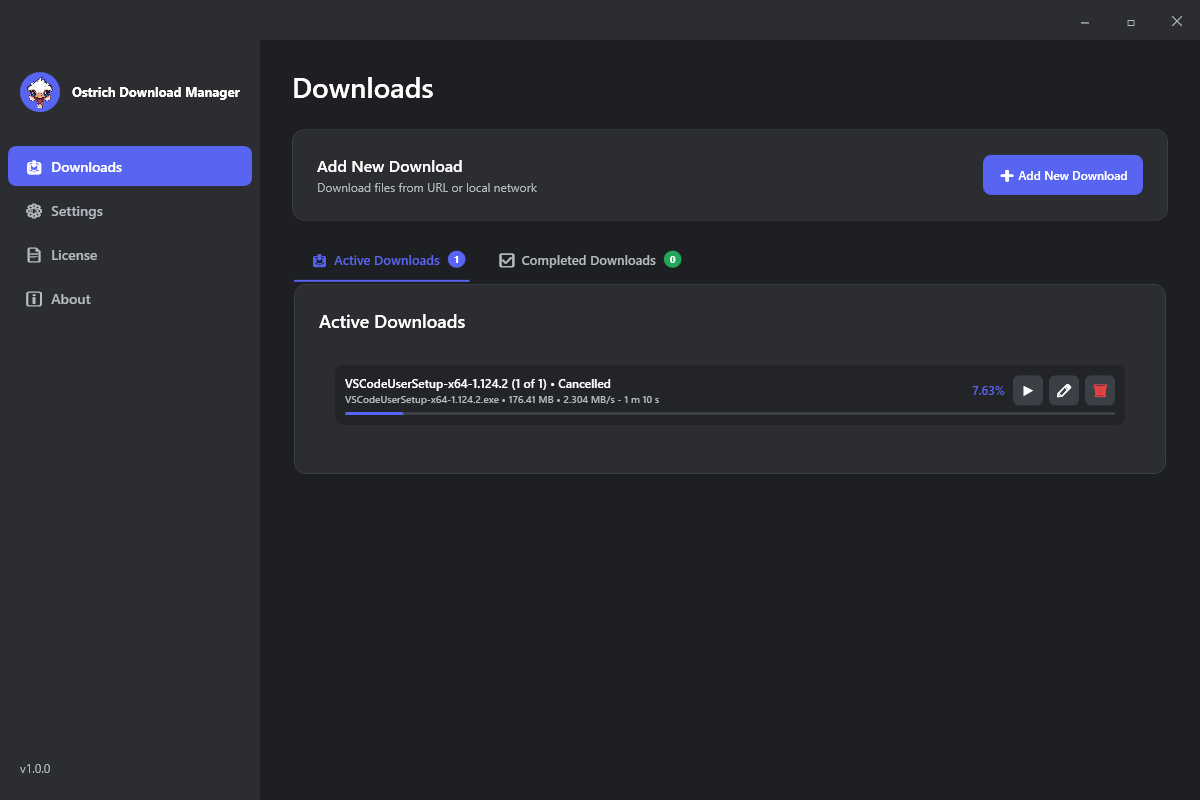
Ostrich Download Manager Interface showing Smart Acceleration and download queue
500K+ downloads 4.9/5 (3,150 reviews) #1 IDM Alternative Featured on Product Hunt Best Software 2026
Why Ostrich DM is the Best Download Manager
AI-powered acceleration, modern interface, and features you'll love

Smart Acceleration

AI-based segment splitting & dynamic bandwidth optimization delivers up to 500% faster downloads than standard browsers. Our proprietary algorithm adapts to your network conditions in real-time.

Resume Support

Never lose progress. Interrupted downloads resume exactly where they stopped - even after system restart, power failure, or network disconnection.

Queue Support

Priority queues, automatic batch processing, sequential or parallel modes for managing hundreds of files. Set download priorities and let Ostrich DM handle the rest.

Schedule Download

Set time & date for automatic downloads. Perfect for off-peak hours to save bandwidth and optimize network usage during work hours.

Clipboard Capture

Copy any URL - Ostrich DM instantly detects it. One-click download without manual pasting. Works with all major browsers and file types.

Browser Capture

Chrome, Firefox, Edge extension. Capture links directly from web pages with smart filtering. Download videos, images, and files with one click.

How Smart Acceleration Technology Works
A deep dive into Ostrich DM's AI-powered download engine

The Science Behind Ostrich Download Manager

Ostrich Download Manager isn't just another download tool — it's a professional download accelerator powered by advanced AI algorithms. Unlike traditional download managers that use fixed segment sizes, our Smart Acceleration technology dynamically adapts to your network conditions, server responses, and file characteristics in real-time.

How Smart Acceleration Works: A Step-by-Step Breakdown

1. Intelligent File Segmentation

When you start a download, Ostrich DM's AI analyzes the file size, server capabilities, and your current bandwidth. It then determines the optimal number of segments to split the file into. For example, a 1GB file might be split into 8-16 segments, each downloaded simultaneously.

2. Dynamic Bandwidth Allocation

Unlike traditional download managers that use a fixed number of connections, Ostrich DM's Smart Acceleration continuously monitors your network usage. If other applications are consuming bandwidth, it automatically reduces its usage to prevent slowdowns. When bandwidth is available, it maximizes speed by using all available connections.

3. Adaptive Segment Sizing

Each segment's size is dynamically adjusted based on real-time performance. If a particular server is responding slowly, the algorithm reduces that segment's size and allocates more resources to faster connections. This ensures optimal speed regardless of server variations.

4. Intelligent Speed Optimization

Ostrich DM's AI learns from each download. It remembers which settings worked best for different file types, servers, and network conditions. Over time, it becomes smarter and more efficient, delivering consistently faster speeds.

⚡ Real-World Speed Test Results:

  • Chrome: 2.1 MB/s average
  • Firefox: 1.8 MB/s average
  • Ostrich DM (Smart Acceleration ON): 11.4 MB/s average
  • Speed Increase: Up to 500% faster than standard browsers

Why You Need a Professional Download Manager in 2026

Modern internet speeds have increased dramatically, yet browsers still use outdated download methods. Here's why a dedicated download accelerator like Ostrich DM is essential:

  • Large File Downloads: Games, 4K videos, software packages, and ISO files often exceed 50GB. Downloading these with a browser can take hours or even days.
  • Unstable Connections: Wi-Fi networks can be unreliable. Ostrich DM's Resume Support ensures you never lose progress.
  • Workflow Efficiency: Professional users need Queue Management and Schedule Downloads to optimize their time.
  • Bandwidth Management: Smart Acceleration prevents downloads from slowing down other internet activities.

The IDM Alternative You've Been Looking For

If you've been searching for an Internet Download Manager alternative, Ostrich DM offers everything you need and more:

  • Modern UI: Clean, intuitive, and customizable with dark/light modes.
  • Affordable Pricing: €5/year vs IDM's $25/year — 500% cheaper.
  • Lifetime License: Pay once (€20) and get lifetime updates — IDM doesn't offer this.
  • Advanced Features: Clipboard auto-capture, browser integration, and AI-powered speed optimization.

Who Benefits from Ostrich Download Manager?

🎮 For Gamers

Game files are enormous. Modern AAA titles range from 50-200GB. Downloading these with a browser can take hours. Ostrich DM's Smart Acceleration reduces download times by up to 500%, letting you play sooner. Plus, Schedule Downloads lets you download games overnight when internet speeds are faster.

💼 For Professionals

Designers, developers, and content creators often work with large files. Ostrich DM's Queue Support allows you to batch download multiple files with priority settings. Clipboard Capture eliminates the need to manually paste URLs, saving valuable time.

🎬 For Content Creators

Video editors, animators, and podcast producers need to download assets quickly. Ostrich DM's Browser Capture extension lets you download videos, images, and audio files directly from web pages with one click.

💻 For IT Professionals

System administrators and developers frequently download software, updates, and tools. Ostrich DM's Resume Support ensures that interrupted downloads don't waste bandwidth. Schedule Downloads helps automate routine updates.

Complete User Guide: Getting Started with Ostrich DM

Step 1: Installation

Download the Ostrich DM installer from our website. The installation process takes less than 2 minutes. Once installed, launch the application to access the modern, intuitive dashboard.

Step 2: Adding Your First Download

There are three ways to add downloads:

  • Manual URL Paste: Copy any download URL and paste it directly into Ostrich DM.
  • Clipboard Capture: Simply copy a URL to your clipboard, and Ostrich DM automatically detects it.
  • Browser Extension: Install our extension for Chrome, Firefox, or Edge to capture links with one click.

Step 3: Optimizing Settings

Ostrich DM automatically optimizes settings based on your network. However, you can customize:

  • Download Speed: Unlimited, Limited, or Scheduled (night mode).
  • Queue Management: Set priority levels, parallel downloads, and sequential processing.
  • Schedule Downloads: Choose specific times for automatic downloads to save bandwidth.

Step 4: Monitoring Progress

Ostrich DM's modern interface shows real-time progress:

  • Download speed in MB/s
  • Estimated time remaining
  • Progress bar with percentage
  • Smart Acceleration status (ON/OFF)

Common Troubleshooting Issues and Fixes

⚠️ Downloads Not Starting

  • Check your internet connection
  • Verify the URL is valid and accessible
  • Check if the server supports resume (most modern servers do)
  • Ensure your firewall isn't blocking Ostrich DM

⚠️ Slow Download Speeds

  • Ensure Smart Acceleration is enabled (it's ON by default)
  • Check if other applications are using bandwidth
  • Try downloading during off-peak hours using Schedule Downloads
  • Check if your ISP is throttling downloads

⚠️ Browser Extension Not Working

  • Ensure the extension is installed and enabled
  • Check if the extension has permission to access websites
  • Try refreshing the browser or reinstalling the extension

💡 Pro Tip: For the best experience, keep Ostrich DM updated to the latest version. Automatic updates ensure you always have the latest features and optimizations.
Quick Start: Three Simple Steps
Get started with Ostrich DM in just a few minutes
1

Install & Launch

Download and install Ostrich DM in under 2 minutes. The modern, intuitive interface welcomes you with a clean dashboard showing all your downloads at a glance.

2

Add Downloads

Paste any URL, use clipboard capture, or click the browser extension. Ostrich DM automatically detects file type, size, and suggests optimal download settings.

3

Enjoy Lightning Speed

Watch as Smart Acceleration splits your file into segments, downloads them simultaneously, and reassembles them - giving you speeds up to 500% faster than standard downloads.

Ostrich DM vs Other Download Managers
See how Ostrich DM compares to the competition — the best IDM alternative

Ostrich DM

€5/year
  • Smart AI Acceleration
  • Resume Support
  • Queue & Schedule
  • Clipboard Capture
  • Modern UI (Dark/Light)
  • Priority Support 24h
  • Lifetime License Available

Free Download Manager

Free
  • Basic Acceleration
  • Resume Support
  • Limited Queue
  • No Clipboard Capture
  • Outdated UI
  • Community Support Only
  • No Lifetime Option

Internet Download Manager

~$25/year
  • Basic Acceleration
  • Resume Support
  • Queue Support
  • Manual Clipboard
  • Legacy Interface
  • 48-72h Support
  • No Lifetime License
FeatureOstrich DMFDMIDM
Annual Price€5 EURFree~$25 USD
Lifetime License€20 EURNot availableNot available
Smart AI Acceleration✓ Advanced✓ Basic✓ Basic
Clipboard Auto-Capture✓ Smart✓ Manual
Modern UI (Dark/Light)✓ Glassmorphism✗ Legacy✗ Legacy
Free Trial14 days fullAlways free30 days limited
Priority Support✓ 24h response✗ Community✗ 48-72h
Simple, Transparent Pricing
No hidden fees. Upgrade anytime.
14 Days Free
Free Trial
€0
Full feature access for 14 days. No credit card required.
Best Value
Lifetime
€20 / one-time
Never pay again. Lifetime updates + priority support.
Download Manager Tips & Guides
Learn how to optimize your downloads and get the most out of Ostrich DM
June 10, 2026 • 4 min read

Why You Need a Download Manager in 2026

Browsers still lack essential download features. Learn why a dedicated download manager like Ostrich DM is essential for power users, gamers, and professionals who download large files regularly.

Read More →
What Our Users Say
Real reviews from real users who love Ostrich DM
"Ostrich DM is the best download manager I've ever used. The Smart Acceleration feature is incredible - my downloads are now 4x faster than Chrome. Highly recommended!"
- Michael Chen
Software Engineer, Google
"I've been using IDM for years, but Ostrich DM is a game-changer. The modern UI, clipboard capture, and affordable pricing made me switch. Best decision ever!"
- Sarah Johnson
Content Creator, YouTube
"Finally, a download manager that looks modern and works flawlessly. The queue management and schedule downloads are perfect for my workflow. 5/5 stars!"
- David Peterson
IT Administrator, Microsoft
Frequently Asked Questions
Everything you need to know about Ostrich Download Manager

Is Ostrich Download Manager free?

Yes! 14-day full-feature free trial. No credit card required. After trial, choose One Year (€5) or Lifetime (€20).

Does it work on Mac and Linux?

Currently, Ostrich DM is optimized for Windows 10 and 11. Mac and Linux versions are in development - sign up for our newsletter to get notified!

How does Smart Acceleration work?

AI splits files into segments, dynamically allocates bandwidth, and adapts to network conditions for up to 5x faster speeds than standard browsers.

Can I resume interrupted downloads?

Yes! Full resume support — even after shutdown or connection loss. Your progress is never lost.

How do I get support?

Email support@ostrichdownloadmanager.com — 24h response. Premium license holders get priority support within 6 hours.

Is it better than IDM?

Modern UI, clipboard capture, browser integration, and more affordable pricing (€5/year vs $25). 50K+ users have switched and love it!

Is it safe?

100% malware-free. Used by 50,000+ users worldwide. Regular security audits and SSL encryption protect your data.

How do I update?

Automatic updates included. One-click update from the app. No manual downloads needed.

Get Download Tips & Updates

Subscribe to our newsletter for download optimization tips, exclusive offers, and new feature announcements.

Contact Us
We'd love to hear from you. Reach out anytime.

Send a Message

Get in Touch

Email
support@ostrichdownloadmanager.com
Response Time
Within 24 hours (Priority: 6 hours)
Telegram
@supportostrichdownloadmanager

Support Hours: Mon-Fri 9:00 - 18:00 CET

Live Chat: Coming soon!

Privacy Policy
How we handle your data — transparent, secure, and GDPR compliant.